RobotOps Made Easy: A Practical Guide to Managing Robots, Software, and Robot Fleets
Introduction
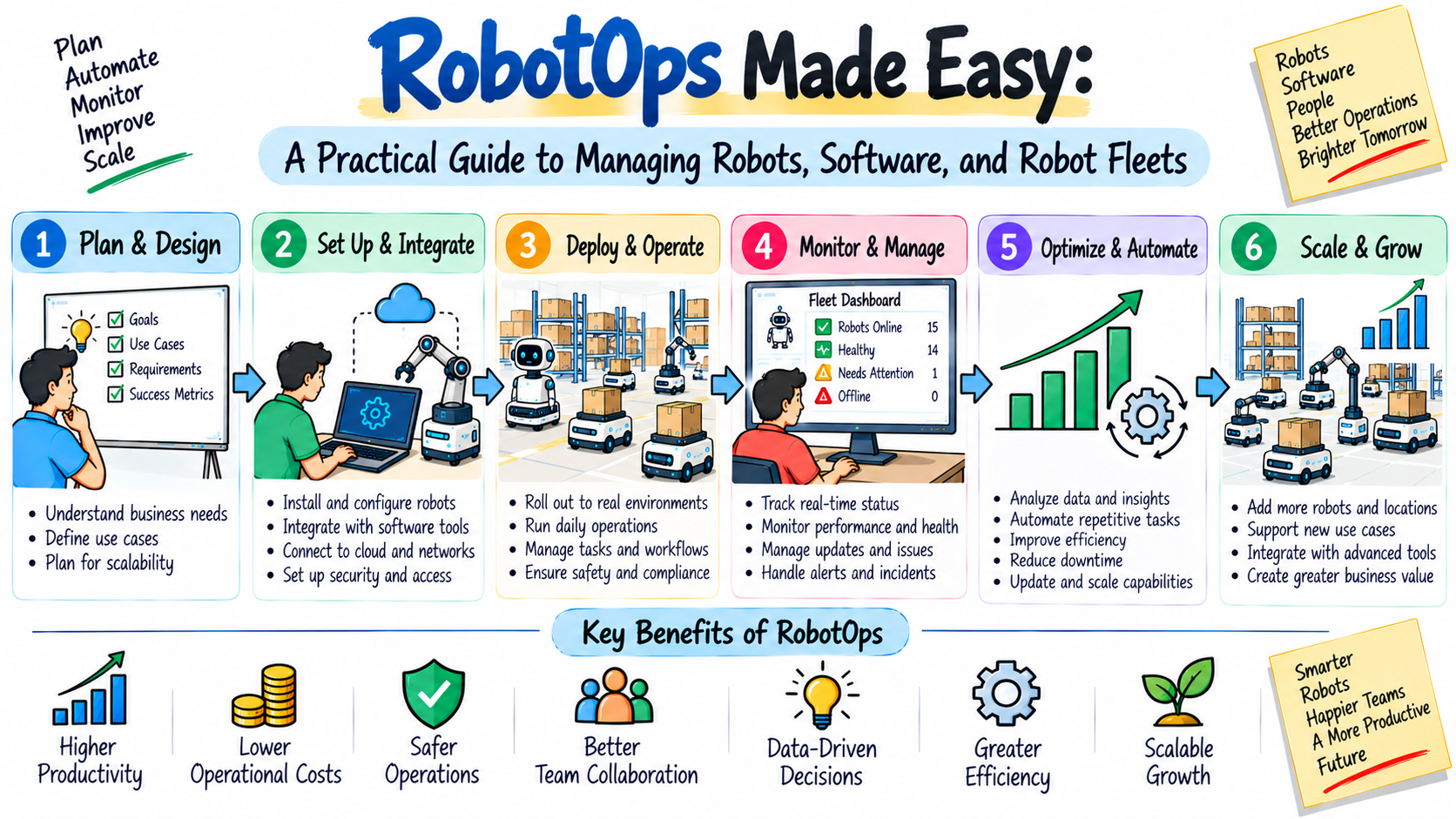
Robots can perform many useful jobs. They can move goods, build products, inspect equipment, and deliver supplies. However, a robot needs regular support after it starts working. Teams must watch its health, update its software, check its sensors, manage its network, and fix problems. The work becomes harder when hundreds of robots operate together. RobotOps gives teams a practical way to handle these tasks. It combines robotics with software operations, automation, monitoring, and maintenance. This guide explains how RobotOps works in simple English. You will learn about Robotics Operations, Robot Fleet Management, Industrial Robotics, Robotics Software, Robot Simulation, ROS 2, Autonomous Mobile Robots, Robotics Automation, and Robotics Operations Centers.
1. Think of RobotOps as Robot Care
A robot needs care just like any working system.
It needs software checks. It needs hardware checks. It needs updates and repairs.
RobotOps organizes this work.
A simple example can make the idea clear.
Imagine a warehouse with 100 robots.
Each robot needs to:
- Receive work
- Move safely
- Complete tasks
- Report its status
- Charge its battery
- Get software updates
- Recover from errors
One person cannot check every robot manually.
RobotOps tools help teams manage this work from a central system.
2. The Four Layers of Robot Operations
Robot systems have several connected layers.
Physical Layer
This includes motors, wheels, robotic arms, batteries, cameras, and sensors.
Software Layer
This includes navigation, control programs, maps, and task logic.
Communication Layer
This handles the network connection between robots and other systems.
Operations Layer
This includes monitoring, updates, maintenance, alerts, and troubleshooting.
RobotOps connects these layers.
Layer
Main Example
Physical
Motor and sensor
Software
Navigation program
Communication
Network connection
Operations
Monitoring dashboard
A problem in one layer can affect another layer.
For example, a weak network can make good software appear broken.
3. What Does RobotOps Actually Do?
RobotOps covers the work that keeps robots useful after deployment.
Teams may use it to:
- Deploy robot software
- Monitor robot health
- Track robot activity
- Manage software versions
- Collect logs
- Review telemetry
- Handle incidents
- Schedule maintenance
- Control access
- Improve robot performance
The exact process depends on the robot.
A delivery robot needs different support from a factory robot.
Still, both need clear operations.
4. RobotOps vs. Traditional Robot Development
Robot development and RobotOps have different focuses.
Robot Development
RobotOps
Builds robot software
Runs deployed software
Designs robot behavior
Monitors robot behavior
Tests new features
Supports daily operations
Creates navigation logic
Tracks navigation issues
Builds new systems
Maintains existing systems
Focuses on creation
Focuses on operation
Both areas work together.
Developers create the robot system.
RobotOps teams help keep that system running.
5. Robot Fleet Management Keeps Large Fleets Organized
When teams operate many robots, Robot Fleet Management becomes important.
A fleet system gives operators a shared view.
They may see:
- Which robots are online
- Where robots are working
- Which tasks they have
- Battery levels
- Software versions
- Current warnings
- Recent errors
- Maintenance status
This information helps operators decide what needs attention.
Simple Fleet Example
Suppose a company operates 60 warehouse robots.
Ten robots show low battery levels.
The fleet system identifies them.
The team can send those robots to charging stations while other robots continue working.
This reduces manual checking.
6. Robot Health Has Many Signals
A robot can appear online and still have problems.
That is why teams should watch more than uptime.
Useful signals include:
Signal
What It Can Show
Battery
Energy condition
Temperature
Possible overheating
Sensor status
Sensor problems
Network
Connection quality
Task time
Work speed
Error count
Repeated faults
Software version
Current release
Location
Robot movement
These signals help teams understand the real condition of a robot.
7. Industrial Robotics Needs Strong Operations
Factories often depend on robots for repeated production work.
Industrial Robotics can support:
- Welding
- Assembly
- Painting
- Packaging
- Picking
- Inspection
- Material handling
A production robot may work for many hours each day.
Even a small issue can interrupt production.
RobotOps can help factory teams track software, machine status, maintenance, and errors.
For example, if one robot starts failing after a software change, the team can compare the new version with the previous version.
This makes troubleshooting easier.
8. Robotics Automation Connects Robots With Workflows
Robotics Automation means using robots to perform repeatable tasks.
The robot often works as part of a larger workflow.
Consider this example:
Customer Order → Warehouse System → Robot Task → Product Movement → Packing → Delivery
The robot handles only one part of the process.
RobotOps helps teams make sure that the robot keeps performing its part correctly.
This approach can support many industries.
Industry
Possible Automated Task
Logistics
Package movement
Manufacturing
Part assembly
Healthcare
Supply delivery
Agriculture
Crop inspection
Research
Sample handling
Retail
Stock movement
9. Robotics Software Makes Robot Actions Possible
A robot needs software to understand what it should do.
Robotics Software may control:
- Sensors
- Cameras
- Navigation
- Mapping
- Motion
- Communication
- Task planning
Several software components may run at the same time.
These components need reliable communication.
Teams also need to know which software version runs on each robot.
That becomes important during troubleshooting.
If one software release creates a problem, teams can identify affected robots and take action.
10. ROS 2 and Robot Software Communication
ROS 2 provides tools for building connected robotics systems.
It helps software components communicate.
A robot might use this flow:
Sensor → Perception → Planning → Navigation → Control
Each stage handles a different part of the robot's work.
ROS 2 supports the software side.
RobotOps supports the wider operations side.
Teams can use monitoring, logging, deployment, and incident practices around ROS 2 systems.
This connection helps developers move from building robots to supporting them in real environments.
11. Robot Simulation Helps Before Physical Testing
Testing directly on a real robot can be slow.
It can also create safety problems.
Robot Simulation offers a virtual testing environment.
Developers can test:
- New routes
- Robot movement
- Maps
- Sensors
- Obstacles
- Navigation logic
- Software updates
- Task workflows
For example, developers can build a virtual warehouse.
They can place shelves and obstacles inside the environment.
They can then see how a robot handles different routes.
After making improvements, they can continue with physical tests.
12. Autonomous Mobile Robots Need Continuous Monitoring
Autonomous Mobile Robots, or AMRs, can move through spaces with limited human control.
They use sensors and software to navigate.
A simple AMR task looks like this:
Get Task → Plan Route → Move → Avoid Obstacle → Reach Target → Report Result
The robot may face changing conditions.
A person may block its route. Another robot may occupy the same area. A sensor may report unusual information.
RobotOps helps operators see these events.
Fleet management can also help coordinate multiple AMRs.
13. A Robotics Operations Center Gives Teams One View
A Robotics Operations Center works like a central monitoring room.
Operators can use it to watch a fleet.
The center may display:
- Fleet health
- Robot locations
- Active jobs
- Error alerts
- Battery levels
- Software versions
- Network status
- Maintenance information
A central view can reduce the need for manual checks.
It can also help teams identify patterns.
If many robots report the same error, operators can investigate the shared cause.
14. RobotOps Uses Data to Find Patterns
Robot data can tell teams more than whether a robot works.
Teams can study patterns over time.
For example, they may find that:
- Robots fail more often after certain updates.
- Batteries drain faster during certain tasks.
- One route creates repeated delays.
- One sensor causes repeated warnings.
- Some robots need maintenance more often.
These findings can guide future improvements.
Good operations teams do not only fix today's problem.
They also look for ways to prevent the same problem tomorrow.
15. Practical RobotOps Scenarios
- Warehouse fleet: Several AMRs stop near the same aisle. The team checks route data and finds a repeated traffic problem.
- Factory line: One robotic arm reports a control error after a software release. The team checks the release history and tests an earlier version.
- Hospital delivery: A mobile robot reaches a low battery level during a task. The system alerts the operator, who assigns another robot.
- Simulation project: Engineers test a new navigation route in a virtual environment before using it on physical robots.
Each case needs both technical tools and clear operations steps.
16. Common RobotOps Mistakes
1. Checking Robots Only After Failure
Teams should monitor robot health before failures become serious.
2. Managing Large Fleets Manually
Manual checks become difficult as fleet size increases.
3. Losing Software History
Teams need clear version records.
4. Skipping Pre-Deployment Tests
Untested changes can create avoidable problems.
5. Ignoring Simulation
Virtual testing can help catch basic issues early.
6. Collecting Too Little Data
Teams need useful logs and telemetry for troubleshooting.
7. Forgetting Network Health
Robots depend on communication.
8. No Recovery Plan
Teams should know how to recover from failed updates.
9. Ignoring Maintenance
Physical parts also need regular attention.
10. Using Too Many Manual Processes
Automation can reduce repeated operational work.
11. Tracking Uptime Alone
Task quality also matters.
12. Ignoring Security
Robot systems need controlled access and safe credentials.
17. A Practical RobotOps Learning Roadmap
People can learn RobotOps in small steps.
Stage 1: Robotics Basics
Learn how sensors, motors, controllers, and robot movement work.
Stage 2: Software Foundations
Study Linux, networking, scripting, and system logs.
Stage 3: ROS 2
Learn how software components communicate in robot systems.
Stage 4: Simulation
Build simple robot environments and test navigation.
Stage 5: Monitoring
Learn how to track robot health and system events.
Stage 6: Fleet Management
Study how teams manage many robots.
Stage 7: Automation
Create repeatable workflows for testing and operations.
Stage 8: Troubleshooting
Practice finding problems through logs and robot data.
This gradual approach can make a large subject easier to understand.
18. How RobotsOps.com Supports RobotOps Learning
RobotsOps.com focuses on educational topics related to robotics operations.
The platform covers areas that learners can study step by step.
These include:
- RobotOps
- Robotics Operations
- Robot Fleet Management
- Industrial Robotics
- Robotics Software
- Robot Simulation
- Autonomous Mobile Robots
- Robotics Automation
- Robotics Operations Center
- ROS 2
The content can help beginners understand the basic ideas behind modern robot operations.
It can also give developers and operations professionals a broader view of robotics systems.
19. A Simple RobotOps Daily Routine
Teams can create a basic daily routine for robot operations.
Morning Check
Review fleet health, battery levels, errors, and network status.
During Work
Watch task performance and important alerts.
After an Incident
Review logs and identify the cause.
Before an Update
Test the change and prepare a recovery plan.
After an Update
Monitor affected robots closely.
End of Day
Review failures, maintenance needs, and task results.
This routine creates consistency.
20. RobotOps Readiness Table
Before expanding a robot fleet, teams can review the following areas.
Area
Basic Readiness Question
Monitoring
Can the team see robot health?
Fleet
Can the team manage many robots?
Software
Are versions tracked?
Testing
Are changes tested first?
Simulation
Can important cases run virtually?
Recovery
Can teams roll back failed changes?
Maintenance
Are service records available?
Security
Is access controlled?
Data
Can teams review logs and telemetry?
Support
Is there a clear incident process?
This simple review can expose gaps before fleet growth.
Frequently Asked Questions About RobotOps
1. What is RobotOps used for?
RobotOps helps teams run and support robots after deployment. It covers monitoring, software updates, fleet management, maintenance, troubleshooting, logs, and automation. Teams can use these practices for small robot projects and large fleets. The exact tools depend on the robot and its working environment.
2. Is RobotOps part of robotics engineering?
RobotOps connects closely with robotics engineering but focuses on operations. Robotics engineers may build robot software and systems. RobotOps teams focus on running those systems, monitoring them, handling failures, managing updates, and improving daily operations.
3. What is Robot Fleet Management?
Robot Fleet Management provides tools for managing many robots. Operators can track locations, tasks, batteries, software versions, errors, and health. Fleet systems reduce the need for manual robot checks. They also help teams understand what happens across the entire fleet.
4. Why is monitoring important for robots?
Monitoring gives teams information about robot health and activity. A robot can stay online while still having poor performance. Teams can watch battery levels, errors, task times, network status, and sensor health. These signals can help teams find problems earlier.
5. How does Industrial Robotics use RobotOps?
Factories use robots for repeated tasks such as assembly, welding, painting, and inspection. These robots need software updates, maintenance, monitoring, and troubleshooting. RobotOps helps teams organize this work and track changes across production systems.
6. What is Robotics Automation?
Robotics Automation uses robots to perform repeatable tasks with less manual effort. Robots may move goods, assemble products, inspect items, or handle supplies. RobotOps helps teams monitor these automated workflows and maintain the robot systems that support them.
7. What is the role of ROS 2?
ROS 2 helps software components communicate within robotics systems. Developers can use it for navigation, sensors, control, and other functions. RobotOps can support ROS 2-based systems with monitoring, logging, deployment, testing, and troubleshooting practices.
8. What can teams test with Robot Simulation?
Teams can test robot routes, maps, sensors, obstacles, navigation, movement, and software changes. Simulation creates a virtual environment. It can help teams find problems before physical testing. Developers still need real-world tests after simulation.
9. What makes Autonomous Mobile Robots different?
Autonomous Mobile Robots can navigate spaces with limited direct human control. They use sensors, maps, and software to move. Warehouses often use AMRs for material movement. RobotOps helps teams manage their navigation, health, software, tasks, and fleet coordination.
10. What is a Robotics Operations Center?
A Robotics Operations Center provides a central view of robot systems. Operators can see fleet status, robot locations, active tasks, errors, battery levels, and other information. This setup helps teams manage robot operations from one place.
11. What skills help a RobotOps Engineer?
Useful skills include robotics, Linux, networking, software development, monitoring, automation, troubleshooting, and system operations. Knowledge of ROS 2, simulation, and fleet management can also help. Engineers can develop these skills gradually through study and practical projects.
12. How can beginners start learning RobotOps?
Beginners can start with robotics basics and software foundations. They can then learn Linux, networking, ROS 2, simulation, monitoring, and automation. Small projects can connect these ideas. RobotsOps.com also provides educational material covering major RobotOps and robotics operations topics.
Final Thoughts
RobotOps gives teams a structured way to run modern robot systems. It brings together software, hardware, monitoring, automation, testing, and maintenance. Robot Fleet Management becomes useful as the number of robots grows. Industrial Robotics needs careful support because production depends on reliable machines. Robotics Software and ROS 2 help power robot behavior. Simulation gives developers a virtual place to test changes. Autonomous Mobile Robots also need regular monitoring and fleet support. Anyone learning RobotOps can start with basic skills and build knowledge over time. RobotsOps.com covers many of these areas and can support learners as they explore the growing field of robotics operations.